Microsoft
- Azure AD SAML Enterprise App Auth using Dex
- Azure AD App Registration Auth using OIDC
- Azure AD App Registration Auth using Dex
Azure AD SAML Enterprise App Auth using Dex
Configure a new Azure AD Enterprise App
- From the
Azure Active Directory>Enterprise applicationsmenu, choose+ New application - Select
Non-gallery application - Enter a
Namefor the application (e.g.Argo CD), then chooseAdd - Once the application is created, open it from the
Enterprise applicationsmenu. - From the
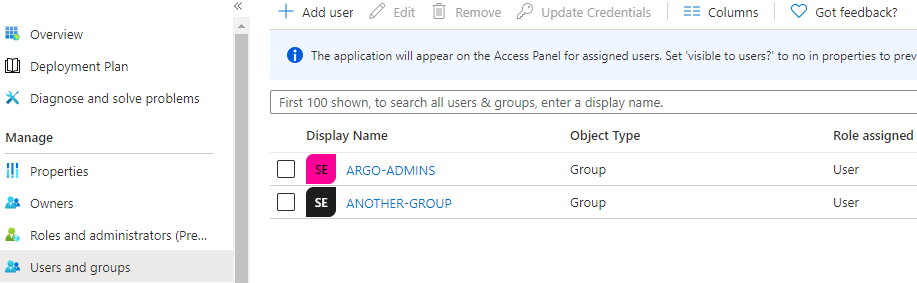
Users and groupsmenu of the app, add any users or groups requiring access to the service.
- From the
Single sign-onmenu, edit theBasic SAML Configurationsection as follows (replacingmy-argo-cd-urlwith your Argo URL): - Identifier (Entity ID): https://
<my-argo-cd-url>/api/dex/callback - Reply URL (Assertion Consumer Service URL): https://
<my-argo-cd-url>/api/dex/callback - Sign on URL: https://
<my-argo-cd-url>/auth/login - Relay State:
<empty> - Logout Url:
<empty>

- From the
Single sign-onmenu, edit theUser Attributes & Claimssection to create the following claims: + Add new claim| Name: email | Source: Attribute | Source attribute: user.mail+ Add group claim| Which groups: All groups | Source attribute: Group ID | Customize: True | Name: Group | Namespace:<empty>| Emit groups as role claims: False- Note: The
Unique User Identifierrequired claim can be left as the defaultuser.userprincipalname

- From the
Single sign-onmenu, download the SAML Signing Certificate (Base64) - Base64 encode the contents of the downloaded certificate file, for example:
$ cat ArgoCD.cer | base64- Keep a copy of the encoded output to be used in the next section.
- From the
Single sign-onmenu, copy theLogin URLparameter, to be used in the next section.
Configure Argo to use the new Azure AD Enterprise App
- Edit
argocd-cmand add the followingdex.configto the data section, replacing thecaData,my-argo-cd-urlandmy-login-urlyour values from the Azure AD App:
data:
  url: https://my-argo-cd-url
  dex.config: |
    logger:
      level: debug
      format: json
    connectors:
    - type: saml
      id: saml
      name: saml
      config:
        entityIssuer: https://my-argo-cd-url/api/dex/callback
        ssoURL: https://my-login-url (e.g. https://login.microsoftonline.com/xxxxx/a/saml2)
        caData: |
          MY-BASE64-ENCODED-CERTIFICATE-DATA
        redirectURI: https://my-argo-cd-url/api/dex/callback
        usernameAttr: email
        emailAttr: email
        groupsAttr: Group
-
Edit
argocd-rbac-cmto configure permissions, similar to example below. -
Use Azure AD
Group IDsfor assigning roles. - See RBAC Configurations for more detailed scenarios.
# example policy
policy.default: role:readonly
  policy.csv: |
    p, role:org-admin, applications, *, */*, allow
    p, role:org-admin, clusters, get, *, allow
    p, role:org-admin, repositories, get, *, allow
    p, role:org-admin, repositories, create, *, allow
    p, role:org-admin, repositories, update, *, allow
    p, role:org-admin, repositories, delete, *, allow
    g, "84ce98d1-e359-4f3b-85af-985b458de3c6", role:org-admin # (azure group assigned to role)
Azure AD App Registration Auth using OIDC
-
Register a new Azure AD Application
Quickstart: Register an application
App Registrations Inputs Redirect URI: https://argocd.example.com/auth/callback Outputs Application (client) ID: aaaaaaaa-1111-bbbb-2222-cccccccccccc Directory (tenant) ID: 33333333-dddd-4444-eeee-555555555555 Secret: some_secret -
Setup permissions for Azure AD Application
On "API permissions" page find
User.Readpermission (underMicrosoft Graph) and grant it to the created application: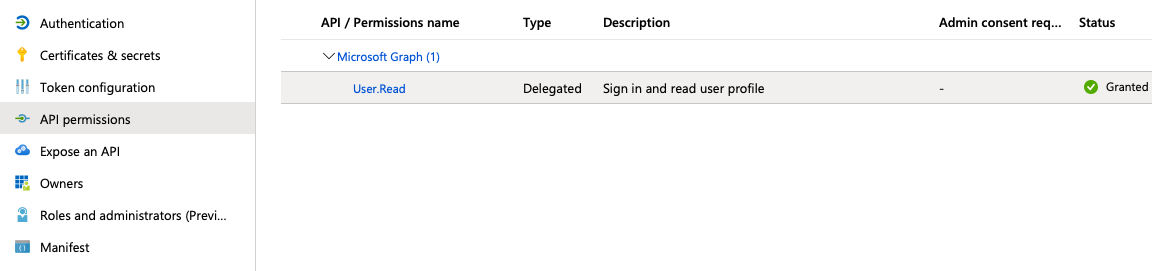
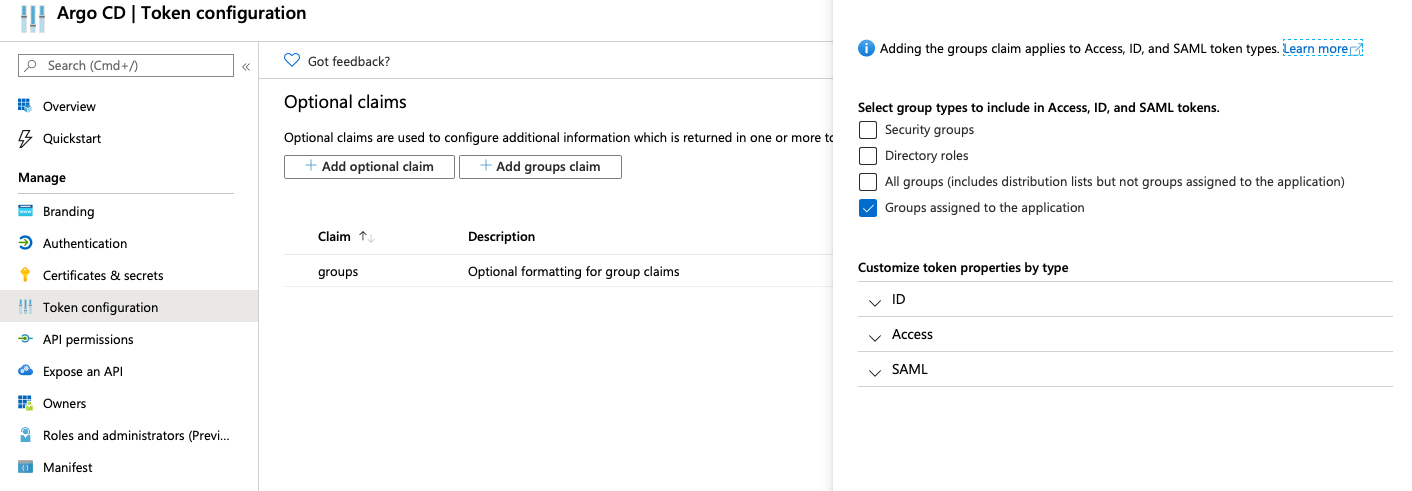
Also, on "Token Configuration" page add groups claim for the groups assigned to the application:
-
Edit
argocd-cmand configure thedata.oidc.configsection:ConfigMap -> argocd-cm data: url: https://argocd.example.com/ oidc.config: | name: Azure issuer: https://login.microsoftonline.com/{directory_tenant_id}/v2.0 clientID: {azure_ad_application_client_id} clientSecret: $oidc.azure.clientSecret requestedIDTokenClaims: groups: essential: true requestedScopes: - openid - profile - email -
Edit
argocd-secretand configure thedata.oidc.azure.clientSecretsection:Secret -> argocd-secret data: oidc.azure.clientSecret: {client_secret | base64_encoded} -
Edit
argocd-rbac-cmto configure permissions. Use group ID from Azure for assigning rolesConfigMap -> argocd-rbac-cm policy.default: role:readonly policy.csv: | p, role:org-admin, applications, *, */*, allow p, role:org-admin, clusters, get, *, allow p, role:org-admin, repositories, get, *, allow p, role:org-admin, repositories, create, *, allow p, role:org-admin, repositories, update, *, allow p, role:org-admin, repositories, delete, *, allow g, "84ce98d1-e359-4f3b-85af-985b458de3c6", role:org-admin -
Mapping role from jwt token to argo
If you want to map the roles from the jwt token to match the default roles (readonly and admin) then you must change the scope variable in the rbac-configmap.
scopes: '[roles, email]'
Azure AD App Registration Auth using Dex
Configure a new AD App Registration, as above.
Then, add the dex.config to argocd-cm:
ConfigMap -> argocd-cm

data:
    dex.config: |
      connectors:
      - type: microsoft
        id: microsoft
        name: Your Company GmbH
        config:
          clientID: $MICROSOFT_APPLICATION_ID
          clientSecret: $MICROSOFT_CLIENT_SECRET
          redirectURI: http://localhost:8080/api/dex/callback
          tenant: ffffffff-ffff-ffff-ffff-ffffffffffff
          groups:
            - DevOps